As we have a new version of Adventureworks database for SQL Server 2012 RC 0 I wanted to start my testing on the same.I downloaded the mdf file from the Codeplex site.
As this is only the MDF file without LDF I went ahead and tried a attach(Attach Databases option) by removing the LDF file which will ensure that we will get a new LDF created automatically.
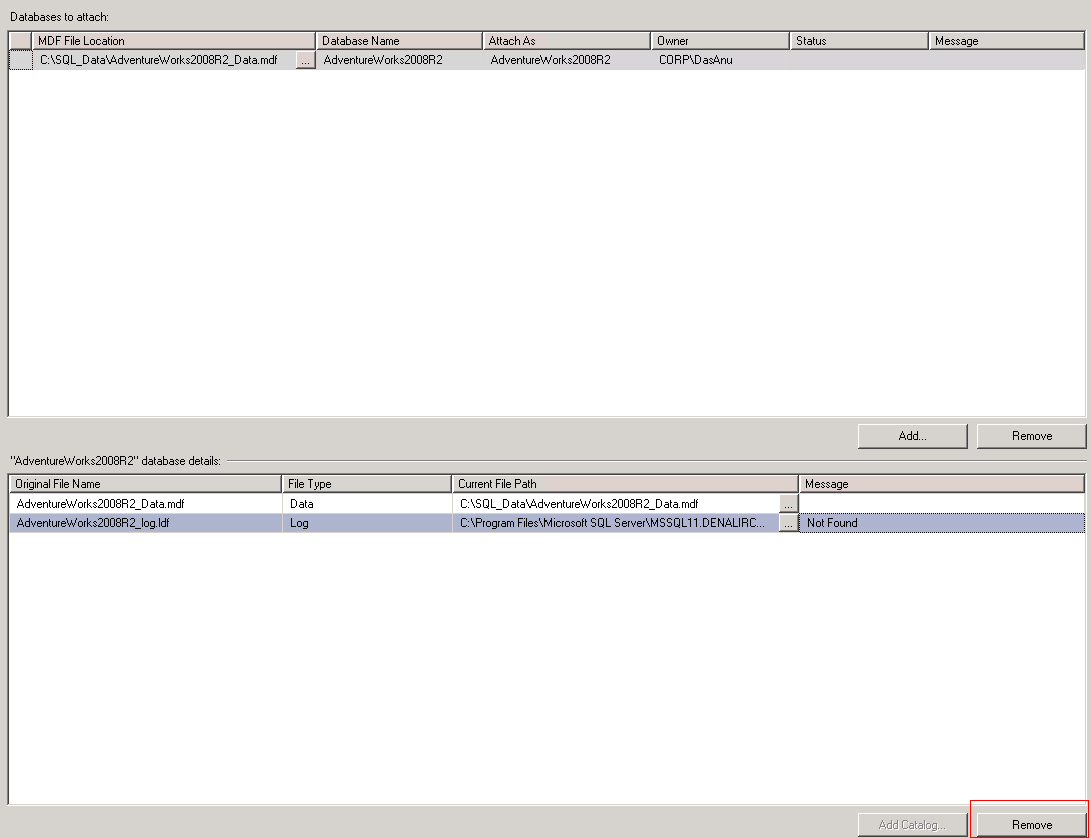
Right away I was hit hard by a strange error which said
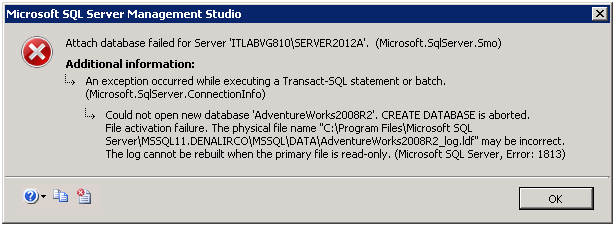
The physical file name path looked strange to me as I did not had such a path in my server.I tried multiple ways to attach the mdf without an ldf including
EXEC sp_attach_single_file_db @dbname = 'AdventureWorks2008R2',
@physname = 'C:\SQL_Data\AdventureWorks2008R2_Data.mdf'
and also using FOR ATTACH_REBUILD_LOG method which Pinal Dave(@pinaldave) clearly explained through his blog post here
Both time same error mentioned above came yet again
File activation failure. The physical file name “C:\Program Files\Microsoft SQL Server\MSSQL11.DENALIRCO\MSSQL\DATA\AdventureWorks2008R2_log.ldf” may be incorrect.
The log cannot be rebuilt when the primary file is read-only.
Msg 1813, Level 16, State 2, Line 1
Could not open new database ‘AdventureWorks2008R2’. CREATE DATABASE is aborted.
Solution – I had a strong feeling that this might be really related to a permission issue and the error message is little mis-leading rather than the actual issue. I went ahead and checked the rights for the Data folder where the mdf file was placed and after re-evaluating and granting permissions to proper SQL accounts the database was attached using normal attach method.


 Cloud & SQLSailor
Leave a reply to Mayur Cancel reply