Today I had to remove multiple named instances of SQL2012 RC 0 editions. Suddenly an idea came to my mind. Is there a way were we can remove multiple named instances all at once.
If you look the below screen, you can see that there are multiple instances available in the same server, and I need to remove the first three instances all at once.
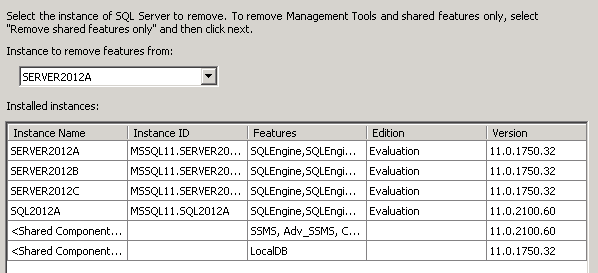
If we use add/remove option, then the above screen will only allow us to choose 1 Instance at a time for removal. This was indeed time consuming, and I was thinking of better ways to remove instances all at once.
Is it possible to remove all the required instances at once? Apparently the answer is NO, you cannot remove all the required instances (Selected ones) using GUI.
I was then looking for ways to speed up the whole process of uninstall and then the idea of cmdline uninstall came to my mind. Using command line we can also make the uninstall unattended.This simply means that SQL Server instance can be uninstalled in quite mode without any user interaction.
The below command line statement was quickly prepared, and this helped me with uninstall with more ease, and I don’t have to involve much rather than running the command for the first time.
You will need to run this command from the setup boot strap folder of the respective version of SQL Server
Setup.exe /Action=Uninstall /FEATURES=SQL /INSTANCENAME=SERVER2012B /Q
/Features = SQL will remove Engine,Replication,Full Text and Data Quality and this option should be used with lot of care.
/Q = Will do the silent mode work and it’s called as Quite mode.
Conclusion
I found cmdline option as much easy and flexible solution and won’t mind to leverage them for non – production environments.
These cmdline options can also be used for Installation purpose, and I will write about the same during coming days.
Thanks for reading.


 Cloud & SQLSailor
Leave a reply to Wilfred Cancel reply